Prayer for Peace of Mind Book Bundle
Creating a meaningful faith-based journal or planner for the Kindle Direct Publishing (KDP) platform is an exciting venture, but the difference between a polished product and one that falls flat often comes down to the tools you choose. The Prayer for Peace of Mind Book Bundle offers a complete package: editable printable prayer journal interior pages and a matching paperback book cover template. Designed specifically for Amazon KDP, this bundle promises to save you time and help you publish with confidence. However, even with a well-designed template, many first-time publishers make avoidable mistakes that hurt their sales, waste their time, or create a poor reader experience. Understanding what this bundle really offers—and what it doesn’t—is the first step to making it work for you.
What the Prayer for Peace of Mind Book Bundle Actually Contains
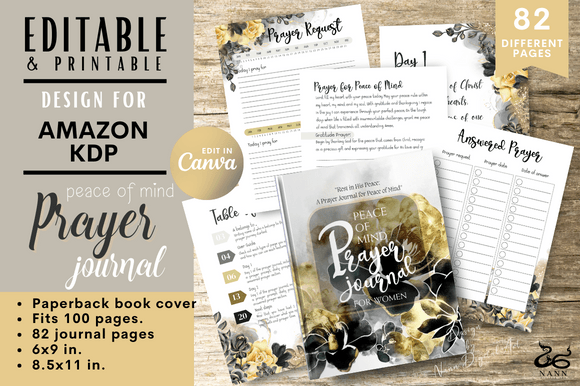
At its core, this bundle is a time-saving asset. You receive a ZIP file containing PDFs with a Canva link that lets you edit every element. The kit includes a paperback book cover that fits 100 interior pages, plus interior page templates for two popular trim sizes: 6” x 9” and 8.5” x 11”. The design is clean and prayer-focused, intended for anyone seeking a structured way to record thoughts, scriptures, and reflections. Because the files are editable in Canva (with a Canva Pro account recommended for full access), you can personalize the content, change colors, swap fonts, or adjust layouts to match your brand.
This bundle is not a pre-made, ready-to-upload file; it’s a starting point that requires you to take action. Many people misunderstand this distinction and later feel disappointed when the product isn’t instantly publishable. Recognizing the difference between a template and a finished book is one of the most important lessons for any KDP creator.
1. Ignoring the Canva Editing Requirement
The most frequent error is assuming the bundle works straight out of the ZIP file. The PDF you download contains the Canva link, not the actual editable file. Beginners sometimes upload the PDF directly to KDP, only to find static, uneditable pages. Worse, they assume the template is broken and leave a poor review for a product that simply requires proper setup.
Better approach: Before you unzip anything, read the included instructions carefully. Open the PDF, click the Canva link, and log in to your Canva account (free or Pro). The template will open in your browser. Duplicate it to your own workspace so you have full editing control. Then, customize every page to your liking. This step ensures you can change text, adjust margins, or add your own prayers and prompts.
2. Overlooking the “Fits 100 Interior Pages” Specification
The cover template is designed to match exactly 100 interior pages. Many sellers try to add more pages to create a “thicker” book, assuming a few extra sheets won’t matter. This throws off the spine width calculation, causing the cover art to be misaligned when uploaded to KDP. The result is a cover that looks stretched, blurry, or does not match the spine thickness.
Better approach: Stick to the 100-page interior design unless you are comfortable recalculating the cover dimensions yourself. If you want a longer journal, you can duplicate the interior pages in Canva to increase the count, but you must also adjust the cover’s spine width in KDP’s cover calculator. It’s often simpler to create multiple variations (e.g., a 100-page and a 150-page edition) using separate cover templates.
3. Using the Wrong Trim Size for Your Audience
The bundle offers two sizes: 6” x 9” and 8.5” x 11”. Some creators choose the larger size because it seems more substantial, without considering that many prayer journals are meant to be carried in a bag or kept on a bedside table. 8.5” x 11” pages are large and can feel like a workbook, which may not appeal to readers looking for a compact devotional journal.
Better approach: Think about your target reader. If you are making a guided prayer journal for daily use during quiet time, 6” x 9” is more portable and intimate. If you are creating a comprehensive prayer planner with lots of writing space or worksheets, 8.5” x 11” may be ideal. Look at bestsellers in the prayer journal category on Amazon to see which sizes perform well, then choose accordingly.
4. Forgetting to Check Bleed and Margin Settings
Even with a template, errors happen if you ignore KDP’s print guidelines. The interior pages in this bundle likely include bleed margins if you selected the “with bleed” option in Canva, but some users accidentally export without bleed, leading to white edges or cut-off content. Similarly, the cover template assumes a specific spine width based on paper type (usually cream or white). If you change the paper type without recalculating, the cover may shift.
Better approach: Before uploading, download a preview copy of your book using KDP’s online previewer. Check every page for content that runs too close to the edge. Ensure the cover’s spine text is centered. Print a physical proof (or use Amazon’s paperback proof option) to verify the final look. This small investment saves you from bad reviews later.
5. Misunderstanding the Digital Download Nature
The product description clearly states that no physical item is shipped—it is a digital download. Yet, some customers expect a printed journal or a finished cover. This confusion leads to frustration. Additionally, because colors can vary between computer screens, the final printed product may look slightly different from what you designed.
Better approach: Treat the digital download as a raw material. After editing, export your files as high-resolution PDFs optimized for print. Use CMYK color mode if possible (Canva Pro supports this). Even if you love how the template looks on your monitor, a test print will reveal any unexpected color shifts or contrast issues. Manage your expectations: the template is a foundation, not a magic bullet.
How to Get the Best Results from This Bundle
Avoiding mistakes is important, but actively optimizing the bundle will make your prayer journal stand out on Amazon. Start by personalizing the content to match your unique voice. The editable interior pages allow you to add your own prayers, scripture verses, or reflective prompts. Replace generic headings with specific themes like “Peace for Anxiety,” “Gratitude and Calm,” or “Morning Prayers.” This customization helps your book rank for specific keywords rather than competing in the generic prayer journal market.
Next, pay attention to the cover design. The pre-made cover is attractive, but you can improve its click-through rate by adjusting the title font, adding a subtitle, or changing the background color to something that pops against Amazon’s mostly white interface. Use the Canva link to experiment with different color palettes while keeping the overall prayer theme. Consider adding a clear, high-quality image that conveys peace—like a soft landscape or a calm abstract pattern—rather than relying solely on text.
Finally, use the bundle as a learning tool. If you are new to KDP, this is a low-risk way to understand the publishing workflow: editing a template, exporting correctly, setting up a KDP account, uploading files, and launching your book. Once you succeed with this prayer journal, you can apply the same skills to other niches. The time saved by using a pre-made template should be reinvested into market research and writing compelling book descriptions.
What to Check Before You Publish
Before you click “Publish,” run through this checklist to ensure the Prayer for Peace of Mind Book Bundle has been used correctly:
- Have you edited the interior pages in Canva to remove any placeholder text or duplicate pages?
- Is your export color space set to CMYK (if printing) and resolution at 300 DPI?
- Does the cover’s spine width match the exact page count and paper type you entered in KDP?
- Did you preview the book inside KDP to catch any text cut-offs or margin issues?
- Is your book cover uploaded as a single PDF or image file that meets KDP’s minimum size requirements?
- Have you set a reasonable price that covers printing costs and leaves room for royalties?
These checks might seem tedious, but they prevent the most common issues that lead to returns, negative feedback, or Amazon blocking your title. A prayer journal created with care reflects the peace you want your readers to find, so treat the production process with the same intention you put into the spiritual content.
Making the Most of Your Editable Canva Template
Many creators underestimate how much they can change inside Canva. The bundle includes both the interior page templates and the cover, but you can repurpose elements. For example, use the cover design as a social media graphic to promote your book. Or take the interior page layout and adapt it for a separate gratitude journal. Because you have the editable link, you are not locked into a single product. This flexibility is a major advantage over static PDFs sold by other sellers.
However, remember that if you modify the design significantly, you lose the “match” between cover and interior. If you change fonts or colors drastically, ensure the final product still looks cohesive. A mismatched interior and cover confuse customers and reduce trust. If you plan to reuse components, create a dedicated brand style guide with the same fonts, colors, and iconography across all your journals.
Final Thoughts
The Prayer for Peace of Mind Book Bundle is a practical resource for anyone wanting to launch a KDP journal quickly without hiring a designer. Yet, success depends on using it correctly: editing in Canva, respecting trim sizes and page counts, testing print settings, and customizing the content to meet reader needs. By avoiding the common pitfalls outlined here, you save time, money, and frustration. More importantly, you create a product that feels intentional and professional—one that can truly help someone find peace through prayer and reflection. Approach the bundle as a collaborator rather than a shortcut, and your readers will thank you for it.